
Table of Contents
If you’ve ever wondered what actually happens behind the scenes to keep your website safe, this post pulls back the curtain. Below is a plain-language breakdown of the website security services we run on every client site — what we do, why we do it, and what it means for you.
The short version: your website sits behind multiple layers of protection — Zero Trust login security, automated backups, malware scanning, firewall protection, and regular audits — all managed for you, at no extra cost, with zero action required on your end.
Here’s the full picture:
Why Website Security Isn’t Optional Anymore
Small business websites are targeted constantly — not because attackers are specifically after you, but because automated bots scan millions of sites a day looking for outdated software, weak passwords, and unpatched plugins to exploit. WordPress powers a large share of the web, which makes it a frequent target simply due to its popularity.
A compromised website isn’t just an inconvenience. It can mean:
- Your site getting blacklisted by Google or flagged as “unsafe” in browsers
- Customer data or contact form submissions being exposed
- Malware being silently injected to redirect your visitors or mine cryptocurrency
- Hours (or days) of downtime while a hacked site gets cleaned and restored
- Long-term damage to the trust your customers place in your brand
This is why website security isn’t something we treat as an add-on. It’s baked into how we host and manage every client site.
Our Website Security Services: The Layers of Protection
Your website sits behind multiple layers of protection—Zero Trust login security, automated backups, malware scanning, firewall protection, and regular audits—all managed for you at no extra cost, with zero action required on your end.
1. Zero Trust Login Security (Cloudflare Access)
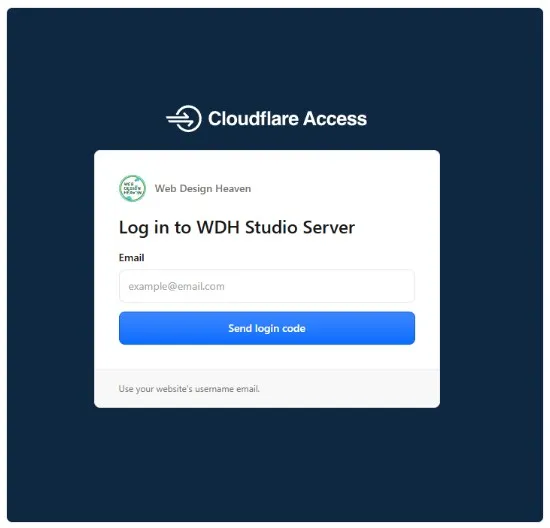
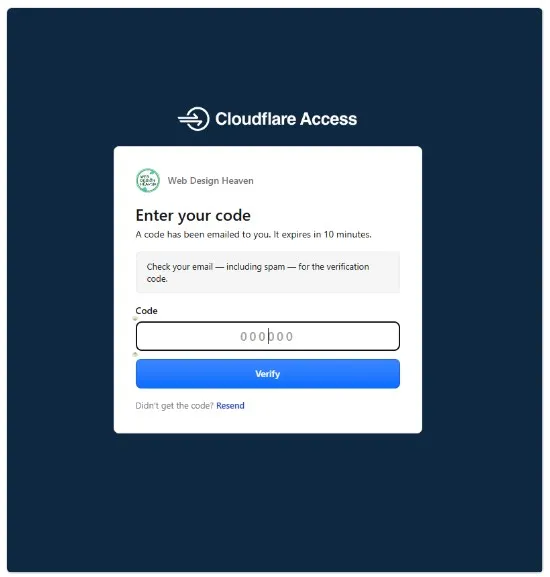
Every client admin login is now protected by Cloudflare Access, part of Cloudflare’s Zero Trust security platform. Instead of a username and password being enough to get in, every login attempt also requires a one-time code sent directly to your email — so a stolen or guessed password alone can no longer get anyone into your site.
The “Zero Trust” principle behind this is simple: never automatically trust a login attempt, no matter where it’s coming from. Every single request gets verified, every time — no exceptions.
This replaced our previous two-factor authentication setup and gives clients enterprise-grade login protection — the same category of technology used by major companies — without any added cost or setup on their end.
2. Web Application Firewall (WAF) & DDoS Protection
Sitting in front of every client website is a firewall that filters out malicious traffic before it ever reaches your server — blocking common attack patterns like SQL injection attempts, brute-force login attacks, and bot traffic, while still letting real visitors through instantly. This same layer also absorbs Distributed Denial of Service (DDoS) attacks, which attempt to overwhelm a site with fake traffic to knock it offline.
3. Automated Malware Scanning
Client sites are regularly scanned for malware, suspicious code injections, and known vulnerability signatures. Catching an issue early — often before it ever affects a visitor — is the difference between a quiet fix and a full site cleanup.
4. Daily Automated Backups
Every site is backed up on a regular, automated schedule and stored securely off-server. If something ever does go wrong — a bad plugin update, a hosting issue, or worst case, a successful attack — we can restore your site to a clean, working state quickly, rather than starting from scratch.
5. SSL/TLS Encryption
Every client site runs on HTTPS with a valid SSL certificate, encrypting the data traveling between your visitors and your website. Beyond the security benefit, this is also a confirmed Google ranking factor, and it’s what shows visitors the padlock icon that signals a trustworthy site.
6. Regular Software & Plugin Updates
Outdated WordPress core files, themes, and plugins are one of the most common ways sites get compromised. We keep client sites updated on a managed schedule, testing changes before they go live so an update never breaks your site’s functionality.
7. Restricted, Role-Based Access
Not everyone who touches your website needs full admin access. We follow the principle of least privilege — giving each person (whether that’s our team or yours) only the access level they actually need, which limits the damage any single compromised account could do.
8. Semi-Annual Security Audits
Twice a year, we conduct a full audit of every client site’s security setup — reviewing login protection, plugin health, backup integrity, and hosting configuration — and roll out upgrades as a result, like the recent move to Cloudflare Access. Security isn’t a “set it and forget it” task; it’s an ongoing process.
What This Means for You as a Client
The honest goal of all of this is that you shouldn’t have to think about your website’s security at all. From your side, nothing changes about how you use your site day to day — you log in the same way, manage your content the same way. The protection running underneath is designed to be invisible until the moment it matters.
That said, a few things are always worth doing on your end too:
- Keep your credentials file somewhere safe and don’t share it over unsecured channels
- Let us know immediately if you notice anything unusual on your site (unexpected pop-ups, redirects, or content changes)
- Reach out if you ever lose your login details — we’re happy to resend them
Frequently Asked Questions
-
Does this cost extra?
No. These website security services are included as part of our ongoing website management for every client — there’s no separate security add-on fee.
-
Will any of this change how I log in or manage my site?
Only in one small way: logging in now includes an extra one-time code step (part of our Cloudflare Access upgrade). Everything else about managing your site stays exactly the same.
-
What happens if my site does get compromised despite these protections?
Because we maintain regular automated backups, we can typically restore your site to its last clean state quickly, minimizing downtime while we investigate and close the gap that was exploited.
-
How often do you update or review these security measures?
We run a full security audit twice a year and apply critical updates as needed in between — security isn’t something we set once and leave alone.
-
Do I need to do anything to benefit from these protections?
No setup is required on your end. The only thing we’d ask is that you keep your credentials file secure and let us know if you ever notice anything unusual on your site.
The Bottom Line
Website security is a moving target — attackers evolve, and so do the defenses that stop them. Our approach combines Zero Trust login protection, firewall and DDoS defense, malware scanning, automated backups, SSL encryption, and regular audits into one managed system, so your website — and your business — stay protected without you having to lift a finger.
Have questions about your site’s security setup? Reach out to our team anytime — we’re happy to walk you through exactly what’s protecting your site.